Introduction
Running a restaurant involves more than preparing meals and serving customers. Restaurant teams must also manage bookings, organize seating, answer guest questions, and prepare for busy periods. When these tasks lack a clear process, even a well-run restaurant can struggle with delays and booking mistakes.
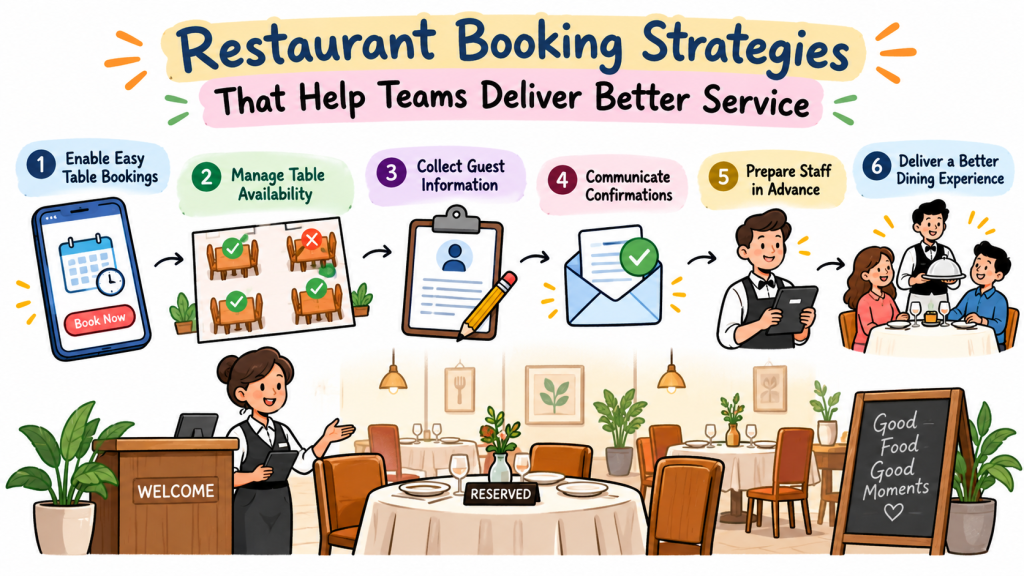
A practical booking strategy helps staff handle these responsibilities with greater confidence. It gives managers a clearer view of expected arrivals and helps hosts make better seating decisions. It also allows employees to prepare for changes before they disrupt service.
Every restaurant has different needs. A small café may handle bookings with a simple calendar, while a busy dining venue may need dedicated reservation software. The best approach depends on the restaurant’s size, customer demand, and daily operations. This guide explores practical ways to improve booking accuracy, manage dining space, support staff, and create a more organized guest experience.
Design a Booking Process Around Daily Operations
A useful reservation process should match the way a restaurant works. Complicated rules can slow staff down, while unclear steps can create confusion.
Start by mapping the booking journey from the first guest request to the final seating decision.
Set Clear Booking Rules
Decide how guests can make reservations and what information staff need. Establish rules for changing bookings, handling late arrivals, and processing cancellations.
Keep these rules simple enough for every employee to follow. Explain any special conditions before guests confirm their reservations.
Assign Booking Responsibilities
Every team member should understand their role. For example, one employee may handle incoming calls, while the host checks table availability and updates the seating plan.
Small restaurants may give one employee several responsibilities. However, managers should make sure another trained employee can take over when needed.
Use One Reliable Booking Record
Staff should not depend on scattered notes or personal messages to manage reservations. A shared booking record helps the team check the latest information.
Restaurants can choose a paper diary, digital calendar, spreadsheet, or reservation platform. The key is to keep the record accurate and accessible to authorized staff.
Collect Details That Help Staff Prepare
Accurate booking information helps restaurants choose suitable tables and prepare for guest arrivals. Missing details can lead to incorrect seating decisions or unnecessary follow-up calls.
Staff should collect the information they need without making the booking process difficult.
Record Essential Information
A typical reservation record may include:
- Guest name
- Contact details
- Booking date
- Arrival time
- Number of guests
- Relevant seating requests
- Reservation status
- Notes needed for service
Employees should check these details before confirming a booking. They should also correct errors as soon as they notice them.
Handle Special Requests Carefully
Guests may ask for accessible seating, space for children, or a particular dining area. Staff should record relevant requests and check whether the restaurant can meet them.
Employees should avoid promising a specific arrangement before checking availability. Clear communication helps guests understand what the restaurant can offer.
Confirm Changes Promptly
Guest plans can change at short notice. Someone may add another person, request a later arrival, or cancel the booking.
Staff should update the reservation record immediately. This prevents other employees from acting on outdated information.
Plan Seating Before Guests Arrive
Good seating plans help restaurants prepare for demand instead of reacting to every arrival. Managers should review reservations before each service period.
Review the Booking Schedule
Check how many guests expect to arrive and when they plan to visit. Look for time slots with several overlapping reservations.
This review can help managers identify possible pressure points. They may need to prepare more tables, adjust staff duties, or review whether the restaurant can handle the expected demand.
Match Tables With Party Sizes
Choose tables that comfortably fit each group. Avoid using a large table for a small party when a suitable smaller option remains available.
However, staff should never squeeze guests into an unsuitable space just to fill more seats. Comfort, safe movement, and service quality should guide table assignments.
Protect Upcoming Reservations
An empty table does not always mean the restaurant can use it for another party. The table may belong to guests who will arrive soon.
Hosts should check the booking schedule before assigning that table. This small step helps prevent avoidable seating conflicts.
Make the Dining Layout Easier to Manage
The arrangement of tables affects both guest comfort and staff efficiency. A practical layout gives guests enough space and helps employees move around the restaurant.
Keep the Floor Plan Accurate
A floor plan should show the current table arrangement and important areas. Staff need accurate information when they assign seats or check availability.
Managers should update the plan whenever they move tables or change the dining area. An outdated plan can lead to incorrect assignments.
Keep Walkways Clear
Staff need room to serve guests and remove used dishes. Guests also need safe, clear routes through the dining area.
Managers should review the layout regularly. They should consider accessibility, staff movement, and the space needed around occupied tables.
Learn From Table Usage
Observe how guests use different parts of the restaurant. Some tables may suit couples, while others work better for families or larger groups.
Managers can use these observations to improve seating rules. They should still check each booking rather than assume every group has the same needs.
Keep Table Information Current During Service
A seating plan only helps when staff update it throughout the day. Employees need to know which tables are free, occupied, reserved, or waiting for cleaning.
Restaurants can use a simple table status system:
| Table status | Meaning | Staff action |
|---|---|---|
| Available | Staff can seat guests | Check the party size and upcoming bookings |
| Reserved | A booking needs the table | Keep the table ready for the expected guests |
| Occupied | Guests are using the table | Follow normal service procedures |
| Needs cleaning | Staff must prepare the table | Arrange cleaning before the next seating |
| Unavailable | Staff cannot use the table | Keep it out of the seating plan |
Staff should update each table’s status as soon as the situation changes.
For example, when guests leave, the host should not mark the table as available until the team confirms that it is ready. This helps prevent guests from arriving at an unprepared table.
Manage Walk-In Guests Without Creating Conflicts
Walk-in guests can fill open tables and bring extra business. Restaurants should welcome them while protecting confirmed reservations.
Check Availability Before Making Promises
Hosts should review current table status and upcoming bookings before offering a table. They should consider the next reservation and the time available for seating another group.
If the restaurant cannot seat guests immediately, staff should explain the situation politely.
Organize a Fair Waitlist
A waitlist helps staff track guests who are waiting for tables. Employees should record the arrival time and party size.
The restaurant should follow a consistent process when seating waiting guests. Staff should explain how the process works and avoid making promises they cannot keep.
Give Realistic Waiting Estimates
Hosts should base waiting estimates on current conditions. They should consider occupied tables, cleaning needs, and upcoming reservations.
If the wait becomes longer, staff should update guests when possible. Honest communication helps people decide whether they want to continue waiting.
Handle Cancellations and Late Arrivals Consistently
Cancellations and late arrivals can change the seating plan quickly. A clear policy helps staff respond fairly and keeps booking records accurate.
Record Cancellations Immediately
When a guest cancels, staff should update the booking status. They can then check whether another party can use the table.
If employees forget to update the record, the restaurant may leave an available table unused or incorrectly treat it as reserved.
Explain Late-Arrival Rules
Restaurants should explain how they handle late arrivals before guests confirm a booking. Staff should apply the stated policy consistently.
When a guest arrives late, the host should check the current situation before making a decision. Clear communication helps avoid misunderstandings.
Review Repeated Booking Changes
Managers can review cancellation and no-show records to understand booking patterns. They may find that certain time slots need better reminders or clearer booking instructions.
The restaurant should use reliable information when making changes. Managers should not make assumptions about individual guests without evidence.
Use Technology When It Solves a Real Problem
Technology can help restaurants organize bookings, but not every business needs the same features. Managers should identify their problems before choosing a tool.
A simple calendar may work well for a small café. A busy restaurant may benefit from software that combines reservations, table availability, and waitlist management.
Features Worth Comparing
Depending on the product, reservation software may offer:
- Online booking forms
- Booking confirmations
- Guest reminders
- Table management
- Digital floor plans
- Waitlist tools
- Guest notes
- Booking reports
- Staff access controls
Restaurants should check the actual features of each platform. They should not assume every system offers all these options.
Consider Cost and Ease of Use
A tool should fit the restaurant’s budget and daily workflow. Managers should review subscription costs, setup needs, customer support, and staff training.
They should also consider whether employees can use the system during a busy shift. A feature-rich platform may not help if staff find it difficult to operate.
Test Before Full Adoption
Let employees practice common tasks before the restaurant relies on a new system. They should learn how to add bookings, change details, cancel reservations, and update table status.
Managers should also prepare a backup process for technical problems. This allows staff to continue handling bookings if the system becomes unavailable.
Common Booking Problems and How to Fix Them
Many reservation problems begin with small errors. Restaurants can reduce these issues by setting clear procedures and reviewing daily operations.
| Problem | Possible result | Practical solution |
|---|---|---|
| Incorrect party size | Staff choose an unsuitable table | Confirm the number of guests |
| Missing booking details | Employees need extra follow-up | Check required fields before confirmation |
| Outdated table status | Staff assign an unavailable table | Update table information promptly |
| Unclear cancellation policy | Guests misunderstand the rules | Explain conditions before confirming |
| Poor team communication | Employees follow different plans | Hold a short pre-service meeting |
| Unrealistic waiting estimates | Guests become frustrated | Base estimates on current availability |
| Outdated floor plan | Staff make incorrect seating decisions | Review the layout after changes |
| Limited staff training | Employees make avoidable mistakes | Train everyone who handles bookings |
Managers should focus first on problems that happen often or disrupt service the most. They can then introduce small changes and review the results.
Measure the Results of Better Planning
Restaurants need a simple way to see whether their changes improve daily operations. A few useful measures can help managers identify trends.
| Measure | What it helps managers understand |
|---|---|
| Booking errors | Whether staff record reservations accurately |
| Guest waiting time | Whether the seating process meets demand |
| Cancellation rate | How often guests change their plans |
| No-show rate | How often booked guests do not arrive |
| Table preparation time | How quickly staff prepare tables for new guests |
| Guest feedback | How customers view the booking and arrival experience |
Managers should review these measures over time rather than judging results from one shift. They should also ask staff what causes delays or confusion.
Numbers provide useful clues, but they do not explain every problem. A long wait may result from a large group, a kitchen delay, or several early arrivals. Managers should understand the cause before changing their process.
Improve Team Communication Before and During Service
Reservation management involves more than the host. Servers, managers, and other employees also need accurate information.
A short briefing before service can help everyone prepare. The team can review large bookings, special requests, expected busy periods, and tables that need attention.
During service, staff should share important updates quickly. If a table needs cleaning or a group changes its size, employees should update the relevant records and inform the right team members.
Managers should also review problems after service. A short discussion can help staff suggest practical improvements without adding unnecessary steps.
Explore DineGlobe for Reservation Management
Restaurants looking for a more organized booking process can explore tools designed for reservation management. The right platform should support the restaurant’s workflow and help staff manage daily booking tasks.
DineGlobe focuses on restaurant reservation and booking management. Restaurant owners and hospitality teams can visit the platform’s official website to learn more and decide whether it suits their needs.
Before choosing a reservation tool, restaurants should check its current features, pricing, and support options. They should also consider staff training and ease of use.
Frequently Asked Questions
1. What makes a restaurant reservation process effective?
An effective process gives staff clear steps for recording, confirming, changing, and cancelling bookings. It also connects reservation details with table availability. Regular updates help employees make accurate seating decisions and provide better information to guests.
2. How can restaurants reduce booking errors?
Restaurants can use one reliable booking record and check important details before confirming reservations. Staff should update changes immediately and avoid relying on memory. Regular training can also help employees follow the same process.
3. What information should staff collect when guests book a table?
Staff usually need the guest’s name, contact details, booking date, arrival time, and party size. They may also record relevant seating requests. Restaurants should collect only necessary information and protect guest details.
4. How can restaurants balance bookings and walk-in guests?
Staff should review confirmed reservations before assigning tables to walk-in guests. They can use available seating, realistic waiting estimates, and a consistent waitlist process. The right balance depends on the restaurant’s capacity and service needs.
5. Why should restaurants maintain a digital or printed floor plan?
A floor plan helps staff understand the dining room and choose suitable tables. It can also support safe movement and reduce seating confusion. Managers should update the plan whenever the restaurant changes its layout.
6. How should a restaurant handle late arrivals?
Restaurants should explain their late-arrival policy before confirming bookings. When guests arrive late, staff should check current table availability and follow the stated rules. Clear communication can help prevent misunderstandings.
7. When should a restaurant start using reservation software?
A restaurant may benefit from software when manual records create frequent errors or take too much staff time. Managers should first identify the problems they want to solve. They should then compare tools based on features, cost, and ease of use.
8. How can a restaurant improve waiting times?
Restaurants can review table assignments, prepare seating areas before busy periods, and keep table status accurate. Hosts should also give realistic estimates and update waiting guests when conditions change. Managers can review waiting-time patterns to identify recurring problems.
9. Which booking performance measures matter most?
Useful measures include booking errors, waiting times, cancellations, no-shows, and table preparation time. Guest feedback also helps managers understand the experience. Restaurants should review these measures regularly and consider the reasons behind any changes.
10. How can DineGlobe help restaurants explore reservation management?
DineGlobe focuses on restaurant reservation and booking management. Restaurant teams can visit its official website to learn more about the platform. Before choosing any tool, they should review its features and confirm that it meets their operational needs.
Final Thoughts
Successful reservation management depends on clear rules, accurate records, and teamwork. Restaurants should prepare seating plans before service, update table information during busy periods, and communicate booking changes quickly.
Managers can begin with simple improvements instead of changing every process at once. Better record keeping, staff training, and regular reviews can help reduce confusion. When booking needs grow, suitable reservation software may provide extra support.
The best approach fits the restaurant’s size, team, and guests. By making practical changes and reviewing their results, restaurants can organize bookings more effectively and create a more welcoming dining experience.
